 QuantumReady
One platform, from the first scan to the signed evidence pack
One engine reads code, build artifacts, container images, cloud configuration and public endpoints. One risk model scores every finding. The same rules run hosted, offline, and inside your coding agent.
Discover, assess, plan, prove
Four steps, each one feeding the next. The output of one is the input to the other, so nothing is retyped and nothing drifts.
1. Discover
Repositories, build artifacts, container images, cloud configuration and public endpoints. The OpenSSL that breaks your compliance story usually arrives in a base image, not in a repository.
2. Assess
Every finding is classified against the quantum model and placed on an evidence ladder, with the file and line behind it. Parsed where the language allows it, matched where it does not.
3. Plan
Prioritise by exposure and by what actually ships, then sequence the work into migration waves with owners and target dates.
4. Prove
Export an evidence pack with stated coverage limits, for a customer, an auditor, a board or a procurement team.
One engine. Every surface.
The engine is what finds cryptography: the rules, the syntax reading, the ownership and action model, and the score. A scanner is where the engine runs.
Free PQC scan
A real TLS handshake against a public domain, or a hosted scan of a public repository. No account, no agent, no access to your systems. The results page is the product, not a teaser.
Public endpoints and public repositories · 250 files or 2 MiB per hosted repository scan
Readiness Workbench
The inventory becomes a plan. Crown jewels, owners, remediation actions, migration waves and the governance answers the CSA Handbook asks for, in one place that a team can actually keep current.
Included from the free plan · Private repositories need a paid plan
Cryptographic inventory
Every service, database, image, endpoint and library in one register, with the system and deployment that uses it. Import CycloneDX from the scanners you already run so the result is one inventory rather than five.
Algorithm, key length, owner, system and exposure
Offline scanner
One download, runs inside your own network. Repositories, container images, build artifacts, hosts and cloud accounts. Source code never leaves your side; reports upload only when you choose.
Useful where code cannot leave the building, or where the estate is behind a private network
MCP server for agents
Call the engine from the agentic coding tools your developers already use. Check a snippet, a host or a repository while the code is being written, and gate the build on the result rather than discovering it a quarter later.
Scan, fix and verify from inside the agent · CI gate with an exit code
Coverage and accuracy
87 rules, 400 patterns, 84 algorithm and finding categories, 22 language families. Precision and recall are measured against a fixed corpus on every release, and the numbers are published rather than claimed.
What it reads, what it skips, and what it cannot see
Findings are the easy part. Assigning them is the work.
A scan tells you what is wrong. It does not tell you who owns it, when it will be fixed, or what you will say to the customer who asks. That is the part the workbench exists for, and it is the part a free TLS checker will never do.
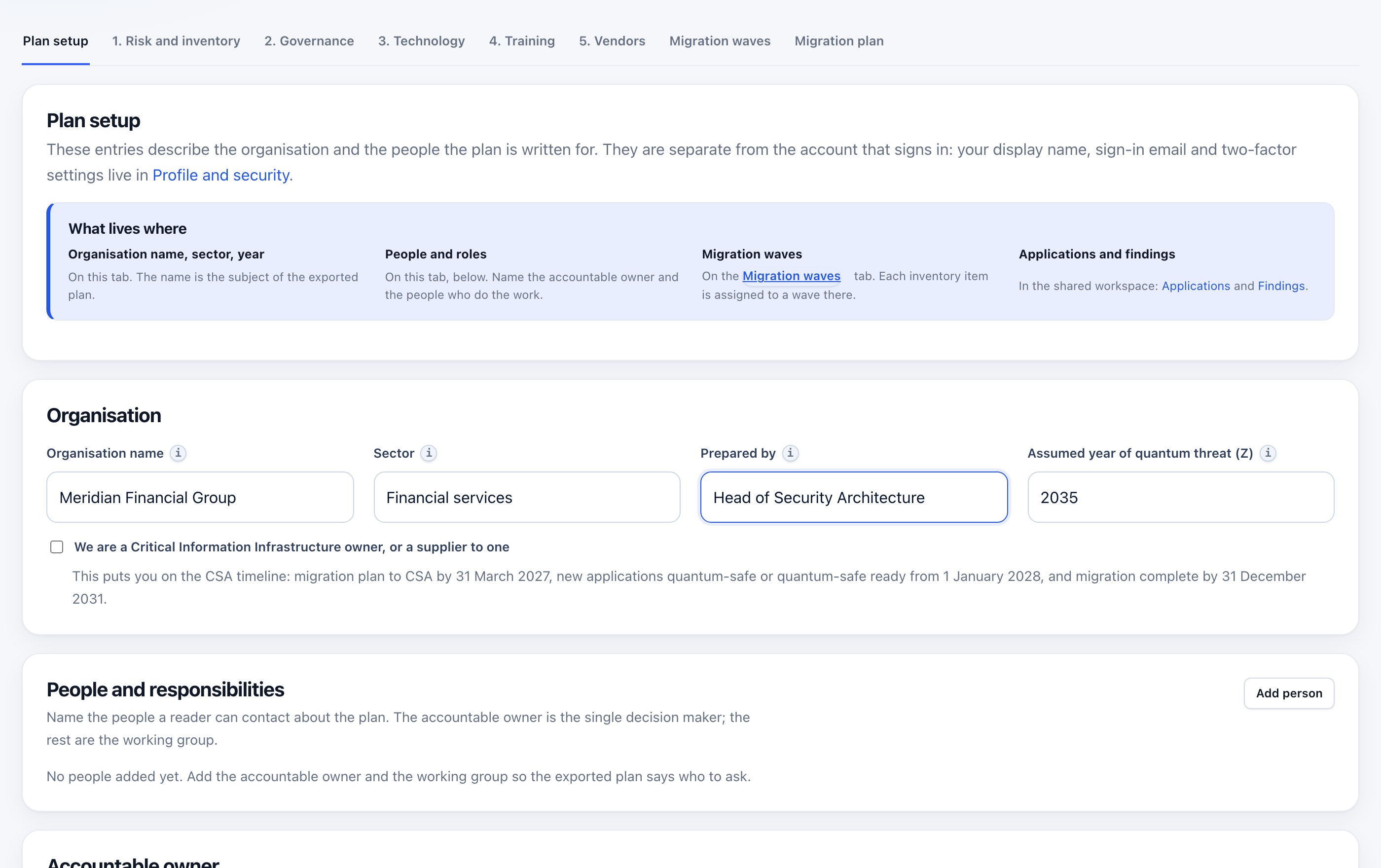
Create the organisation, then name the owner
The plan starts with who it is for and who is accountable. The workbench asks once, and carries those answers into every wave and every export.
- Accountable owner. One named decision maker, the first governance step the Handbook asks for.
- People and responsibilities. The wider roster a reader can contact about a wave.
- The CSA dates. Plan by 31 March 2027, new systems from 1 January 2028, complete by 31 December 2031.
- Sector and horizon. The assumed year of the quantum threat is a stated assumption, not a hidden default.
Owners, not tickets
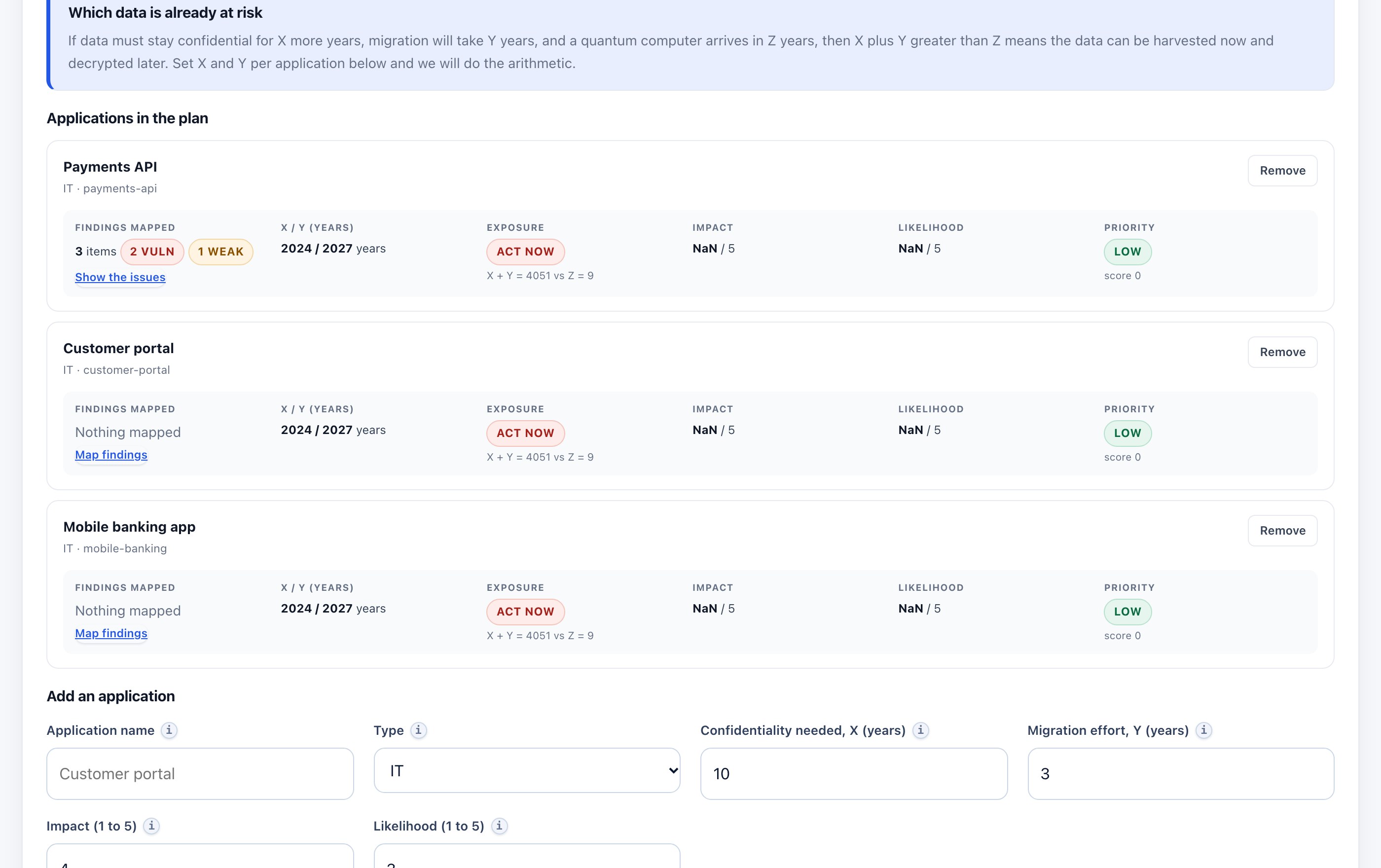
A finding is only urgent in the context of an application. Group what you run, give each one a scope, and the same RSA key means something different in a payment service than in an internal tool.
- A scope per application. A repository, a host or a path. Later scans of that scope attach themselves automatically.
- Exposure, impact, likelihood. Priority is arithmetic on what actually ships, not a flat list sorted by severity.
- An owner on every finding. An unassigned critical finding is visible as unassigned, rather than quietly disappearing.
- No re-mapping on every scan. The mapping work is done once and kept, which is what makes an inventory stay current.
Remediation becomes a wave, not a backlog
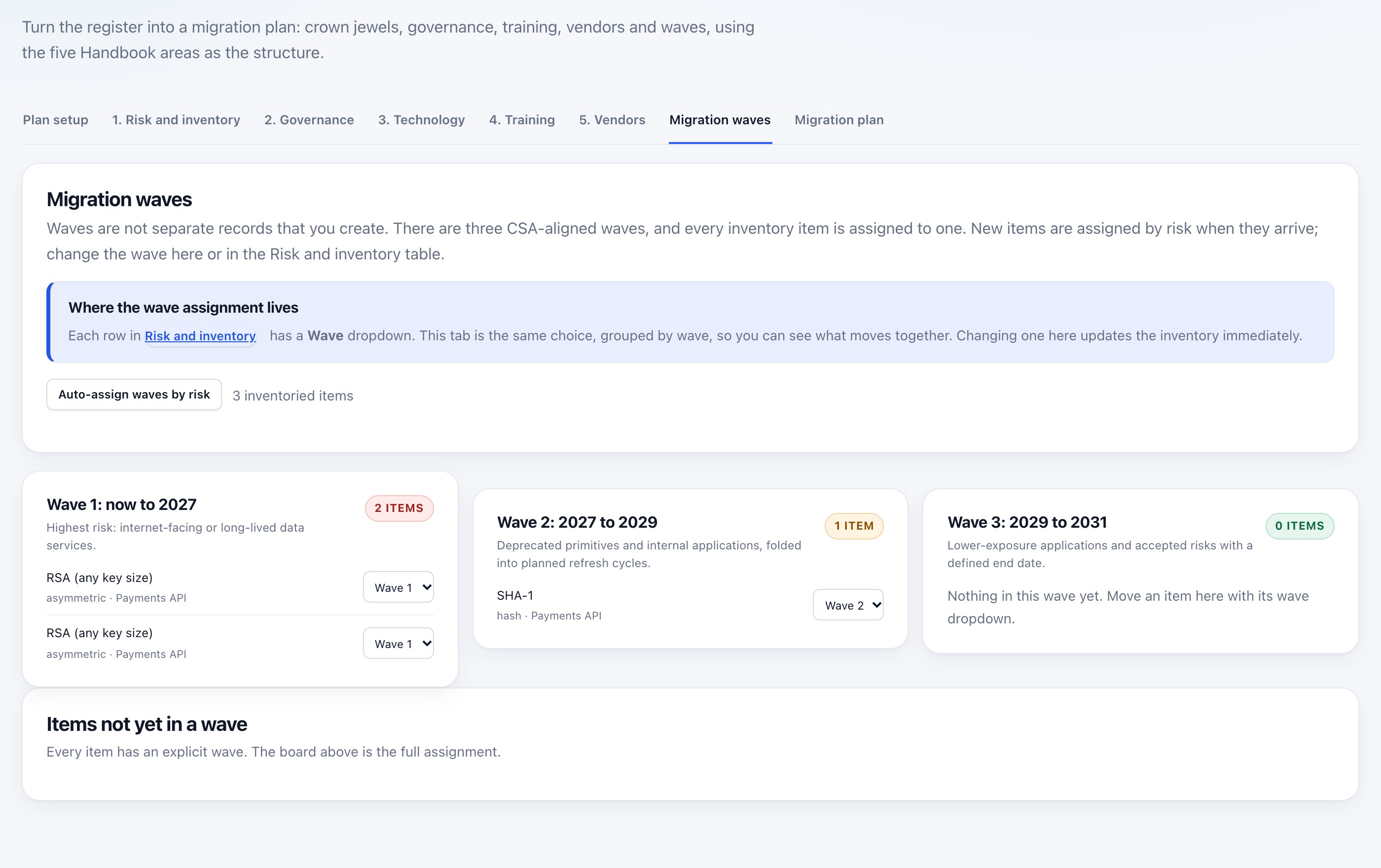
Every item is assigned to one of three CSA-aligned waves. The wave is the unit a board can fund and a team can schedule.
- Three waves. Now to 2027, 2027 to 2029, and 2029 to 2031, aligned to the published dates.
- The replacement travels with the action. ML-KEM for key transport, ML-DSA or SLH-DSA for signatures, hybrid while the ecosystem catches up.
- Owners and dates. Each wave carries the people and the target date it needs.
- Nothing left unassigned. An item outside a wave is shown as outside a wave.
A plan you can hand to a board or an auditor
The exported plan is generated from the inventory, not retyped from it. The number in the pack is the number in the inventory.
- Briefing pack. One document for a board, a customer or an auditor, with the coverage statement attached.
- Exports that fit your tools. CSV, JSON, CycloneDX CBOM and SARIF, plus a ticket CSV for Jira or ServiceNow.
- An honest boundary. The export is a file, not a live connector. If you need a live ServiceNow connection, that is scoped work.
- The CSA structure. Risk and inventory, governance, technology, training and vendors, in the order the Handbook uses.
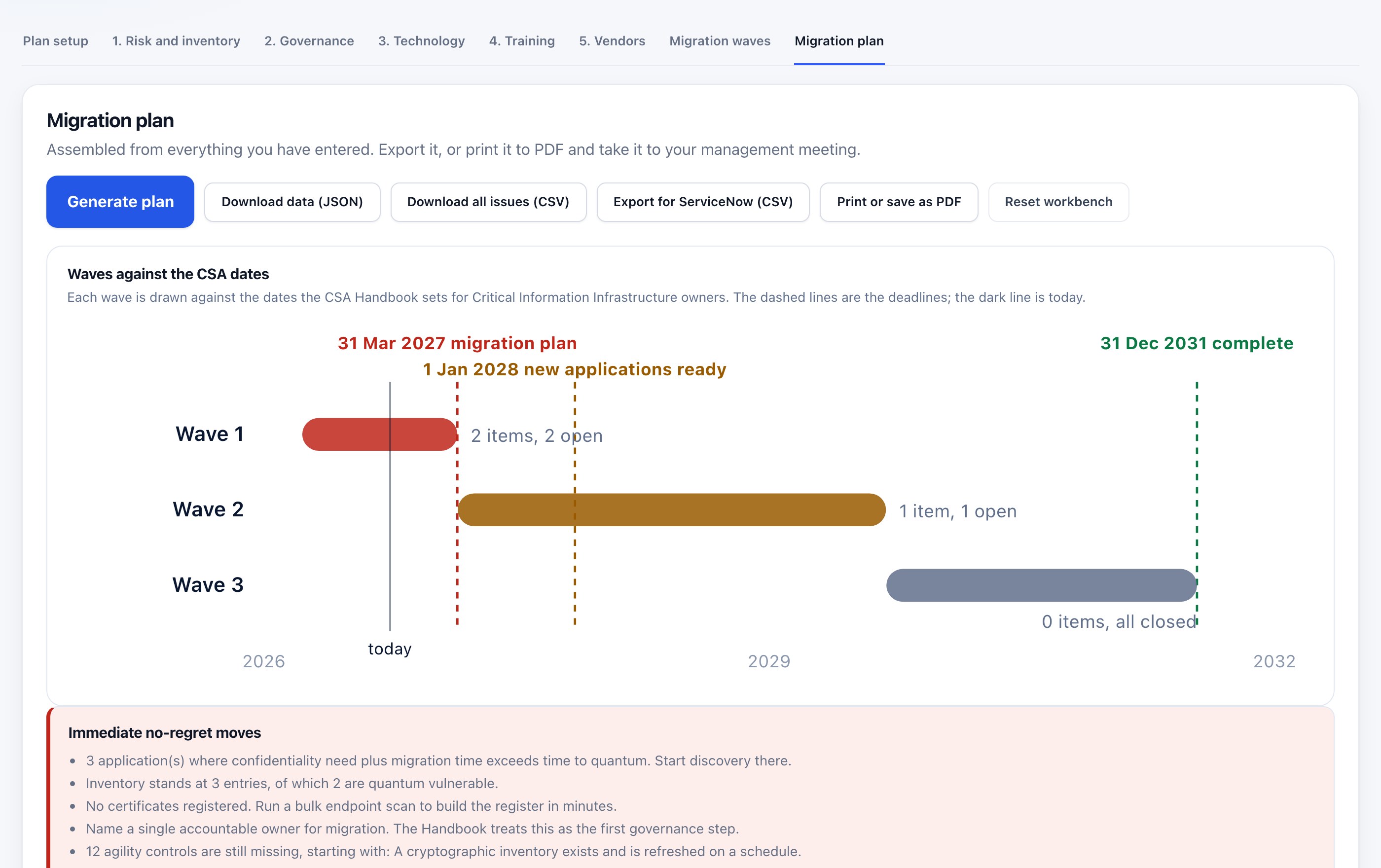
The workbench is included from the free plan. Private repositories, longer retention and evidence exports need a plan. See how pricing works or open the workbench.
What you run, and who needs it
Platform is what you run. Who it's for is who you are. Not every surface matters equally to every buyer, and saying so is more useful than claiming all five are essential to everyone.
| Platform | Technology supplier | Bank / FI | CII / government | Mid-market |
|---|---|---|---|---|
| Free PQC scan A first answer, no account | Primary | Supporting | Supporting | Primary |
| Readiness Workbench Owners, waves and the plan | Supporting | Primary | Primary | Later |
| Cryptographic inventory The inventory and its evidence | Primary | Primary | Primary | Supporting |
| Offline scanner Runs inside your network | Supporting | Primary | Primary | — |
| MCP server Gate the build from the agent | Primary | Supporting | Supporting | Supporting |
Read the four customer situations for the version written from the buyer's side.
A free TLS check measures your edge. It cannot see your code.
| Free PQC TLS checker | QuantumReady | |
|---|---|---|
| What it reaches | Your public endpoint | Code, build artifacts, images, cloud configuration and endpoints |
| What it reads | The negotiated key exchange | 22 language families, 11 of them parsed rather than matched |
| What you get back | A score for one host | An inventory, an owner per finding, a migration plan and an evidence pack |
| Private code | No | Yes, through a linked account or the offline scanner |
| Where it runs | Their server | Hosted, or inside your own network |
| What it says about compliance | Often a score that implies it | Nothing. It reports evidence and states its limits. |
The free scan is genuinely free. It is also the smallest thing the platform does.
Start with the scan. Keep the evidence.
Two minutes on a public repository or a domain, and you will know what the report looks like on your own code.